プロキシ環境下でのNix #
新環境のセットアップ時によく忘れるので. nix-daemonに環境変数が渡っていないとバイナリキャッシュ等に到達できない.
systemd serviceのunitに以下をドロップインで追加する.
[Service]
Environment="http_proxy=<PROXY URL>"
Environment="https_proxy=<PROXY URL>"
Environment="no_proxy=<EXCLUDE DOMAIN>"
Windows環境でのwezterm #
普段からターミナルエミュレータとしてwez/weztermを使用している. クロスプラットフォーム対応で Linux / macOS / Windows のどれでもイケるのがよく,かれこれ3年近く使っている.
ただWindows環境だといくらか難点があり,なぁなぁのまま使っていたが,そろそろ真面目に使い勝手を改善しようかと作り込み始めた.
個人的に一番やっかいなのが,SSH周りである. weztermはlibsshがバックエンドの独自のSSHクライアントを実装している. これの利用してSSH接続を1つのドメインとして扱えるようになっており,Linux / macOSでは重宝している. しかしWindowsでは,おそらくlibsshの実装上の問題か,認証エージェント(1Password)と多段SSHを使うとまともに動作しない.
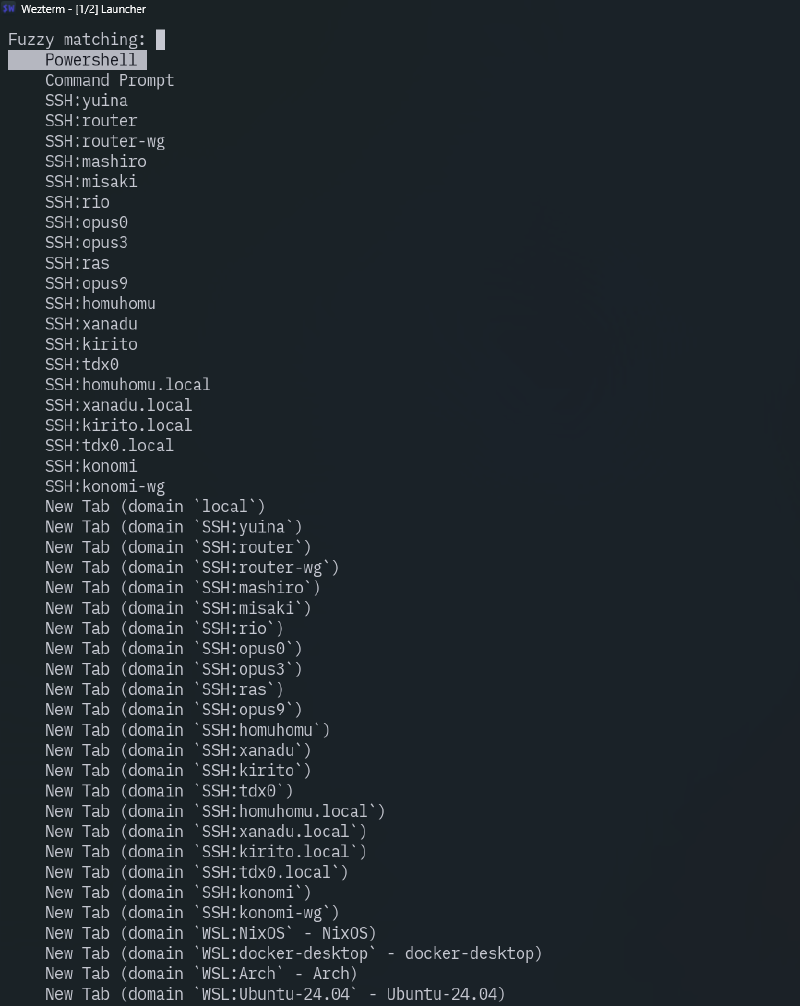
仕方ないのでいつもssh.exeを直打ちしていたが,だんだん面倒になってきたので,Windowsに限ってSSH domainのエントリを元にssh.exeを叩くエントリを作成するようにした.
ssh.exeを使うのであれば認証エージェントに関しても多段に関してもOpenSSH側の仕様で動くので,wezterm側の実装でどうこうなり得ない.
weztermのマルチプレクサ機能は使えないが,そもそもあまり活用していないのでどうでもよい.(バージョン制約がめんどくさくて使うのやめちゃった)
-- Windows Launch Menu
if is_windows then
    -- pwsh & cmd
    config.launch_menu = {
        {
            label = "Powershell",
            domain = { DomainName = "local" },
            args = { "C:\\Program Files\\PowerShell\\7\\pwsh.exe", "-nologo" },
        },
        {
            label = "Command Prompt",
            domain = { DomainName = "local" },
            args = { "C:\\Windows\\System32\\cmd.exe" },
        },
    }
    -- wezterm ssh does not work correctly on windows
    -- create launcher entry directly executing ssh.exe from ssh domain
    local ssh_domains = wezterm.default_ssh_domains()
    local ssh_executable = "C:\\Windows\\System32\\OpenSSH\\ssh.exe"
    for idx, dom in ipairs(ssh_domains) do
        if dom.multiplexing == "None" then -- ignore SSHMUX domain
            table.insert(config.launch_menu, {
                label = dom.name,
                domain = { DomainName = "local" },
                args = {
                    ssh_executable,
                    dom.remote_address,
                },
            })
        end
    end
endis_windowsは設定の最初の方でOS判定をしているもの.
1つのファイルで複数OSの設定を細かく書けるのは,設定にLuaを用いる1つの利点だと思う.
このあたりそのうち詳しく書きたい.